
In Python, you can access elements in a tuple using indexing, slicing, or by unpacking. Here’s a quick guide:
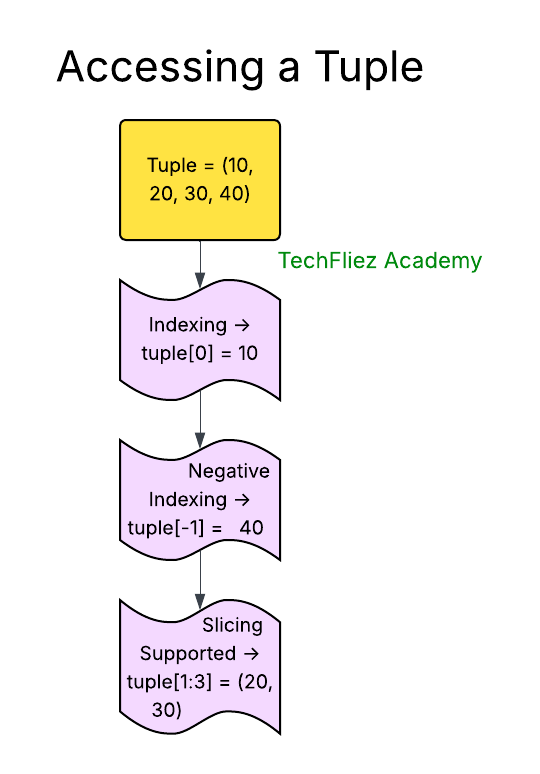
Accessing Elements by Index
1. Each element in a tuple has an index starting from 0 (for the first element) to n-1 (for the last element).
2. You can access elements by referring to their index inside square brackets
my_tuple= (10, 20, 30, 40, 50)
print(my_tuple[0])  # Output: 10
print(my_tuple[3])  # Output: 40
Negative Indexing can be used to access elements from the end of the tuple.
tuplData= (10, 20, 30, 40, 50)
print(my_tuple[-1])  # Output: 50 (last element)
print(my_tuple[-2])  # Output: 30
Slicing a Tuple
Slicing allows you to access a range of elements in a tuple by specifying a start, stop, and optional step.
Syntax:
tuple[start:stop:step]
Example:
my_tuple = (10, 20, 30, 40, 50, 60)
print(my_tuple[1:4])    # Output: (20, 30, 40)
print(my_tuple[:3])     # Output: (10, 20, 30)
print(my_tuple[2:])     # Output: (30, 40, 50, 60)
print(my_tuple[::2])    # Output: (10, 30, 50) (every second element)
Unpacking Tuples
You can assign each element of a tuple to individual variables using tuple unpacking.
my_tuple = ("John", 35, "Engineer")
name, age, profession = my_tuple
print(name)       # Output: John
print(age)        # Output: 38
print(profession) # Output: Engineer
Extended Unpacking: You can also use * to unpack remaining elements into a list.
my_tuple = (1, 2, 3, 4, 5, 6, 7, 8, 9, 10)
a, b, *rest = my_tuple
print(a)     # Output: 1
print(b)     # Output: 2
print(rest)  # Output: [3, 4, 5, 6, 7, 8, 9, 10]
Accessing Nested Tuples
If a tuple contains other tuples, you can access nested elements by chaining indices.
nested_tuple = (1, (2, 3), (4, 5, 6))
print(nested_tuple[1])      # Output: (2, 3)
print(nested_tuple[1][1])   # Output: 3
print(nested_tuple[2][0])   # Output: 4
Using a Loop to Access Elements
You can also use a for loop to iterate over elements in a tuple.
my_tuple = (10, 20, 30, 40, 50)
for item in my_tuple:
    print(item)
# Output: 10 20 30 40 50
Accessing a Tuple – Interview Questions
Q 1: How do you access tuple elements?
Q 2: Can you access elements using negative indexing?
Q 3: Can you access a range of elements in a tuple?
Q 4: Can tuple elements be modified while accessing?
Q 5: Can you loop through a tuple?
Python Accessing a Tuple – Objective Questions (MCQs)
Q1. How do you access the first element of a tuple t = (10, 20, 30)?
Q2. What is the output of the following code?
colors = ('red', 'green', 'blue', 'yellow')
print(colors[-1])
Q3. What will the following code print?
nums = (1, 2, 3, 4, 5)
print(nums[1:4])
Q4. How can you access the second-to-last element of a tuple t = (5, 10, 15, 20)?
Q5. What is the output of the following code?
t = ('a', 'b', 'c', 'd')
print(t[::2])