
Introduction
The do-while loop is slightly different from other loops. It ensures that the code block executes at least once, regardless of whether the condition is true or false. This makes it very useful in situations where you need to run a block of code before checking a condition.
What is a PHP Do-While Loop?
The do-while loop in PHP is a type of loop that executes a block of code first and then checks a condition. If the condition is true, the loop continues; otherwise, it stops.
In simple terms:
- Execute code first
- Then check the condition
- Repeat if the condition is true
- Executes at least once
- Condition is checked after execution
- Useful when at least one execution is required
- Also known as a post-test loop
Syntax
Basic Syntax:
do {
   // code to execute
} while (condition);
Explanation:
- do → executes the code block first
- while → checks condition after execution
- The loop continues if the condition is true
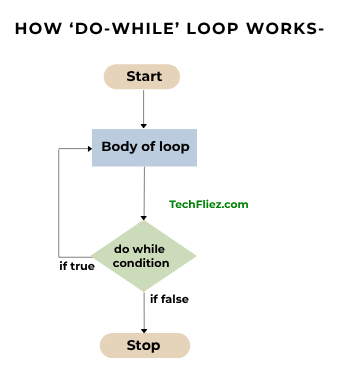
Examples:
Example 1: Basic Do-While Loop
<?php
$x = 1;
do {
   print $x . "<br/>";
   $x++;
} while($x < 5);
?>
Output:
2
3
4
Example 2: Condition False Initially
<?php
$x = 10;
do {
   echo $x . "<br/>";
   $x++;
} while($x < 5);
?>
Output:
Note: Even though the condition is false, the loop runs once.
Example 3: Decrement Example
<?php
$x = 5;
do {
   echo $x . "<br/>";
   $x--;
} while($x > 1);
?>
Example 4: Using Break
<?php
$i = 1;
do {
   if($i == 3) {
       break;
   }
   echo $i . "<br/>";
   $i++;
} while($i <= 5);
?>
Example 5: Using Continue
<?php
$i = 0;
do {
   $i++;
   if($i == 2) {
       continue;
   }
   echo $i . "<br/>";
} while($i < 5);
?>
Real-Life Example
Scenario 1 : Menu-Based Program
<?php
$choice = 1;
do {
   echo "1. Start Game<br/>";
   echo ". Exit<br/>";
   $choice = 2; // suppose user selects exit
} while($choice != 2);
echo "Program Ended";
?>
Why this is useful:
- Displays the menu at least once
- Waits for user decision
- Common in CLI applications
Scenario 2: Form Retry System
<?php
$input = "";
do {
   $input = "user input"; // suppose user enters value

} while(empty($input));
echo "Valid input received";
?>
Note: Ensures the user enters data at least once.
Common Mistakes
1. Missing Semicolon
while($x < 5)
Note: Must end with ;
2. Infinite Loop
do {
   echo $x;
} while($x < 5);
Note: Missing update of $x.
3. Wrong Condition
while($x > 10);
Note: May stop the loop unexpectedly.
4. Confusing While and Do-While
- while → checks first
- do-while → executes first
5. Forgetting Update Logic
Without increment/decrement, the loop may not behave correctly.
Conclusion
The PHP do-while loop is a useful looping structure that ensures code execution at least once. It is particularly helpful in scenarios where the condition should be checked after performing an action.
By mastering the do-while loop, you can:
- Build interactive applications
- Handle user input effectively
- Write flexible and dynamic code
PHP do-while loop – Interview Questions
Q 1: What is do-while loop?
Q 2: When is the condition checked?
Q 3: Syntax example?
Q 4: Difference between while and do-while?
Q 5: When to use do-while?
PHP do-while loop – Objective Questions (MCQs)
Q1. do...while loop executes the block ______.
Q2. Condition in do...while is checked ______ the loop body.
Q3. do...while ends with ______.
Q4. Which loop guarantees at least one execution?
Q5. do...while is useful when the loop body must run ______.