
Exception handling is a mechanism in Java to handle runtime errors, allowing the normal flow of execution to continue. Instead of crashing the program, Java provides a way to catch and handle exceptions using try, catch, finally, throw, and throws.
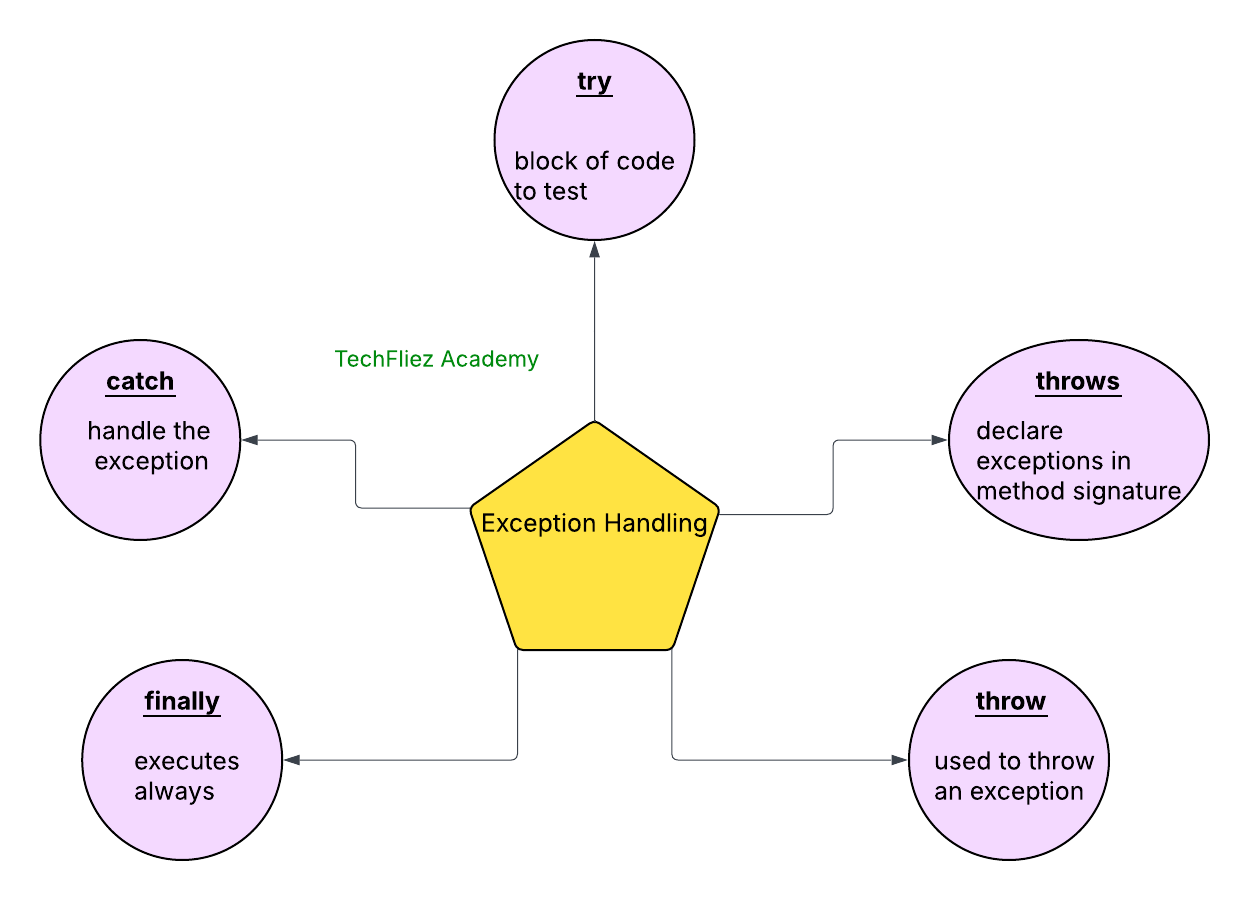
Java exception handling is managed via five keywords: try, catch, throw, throws, and finally.
Briefly, here is how they work. Program statements that you want to monitor for exceptions are contained within a try block. If an exception occurs within the try block, it is thrown. Your code can catch this exception (using catch).
The Java run automatically throws system-generated exceptions- time system. To manually throw an exception, use the keyword throw. Any exception that is thrown out of a method must be specified as such by a throws clause. Any code that absolutely must be executed after a try block completes, and is put in a finally block.
Why is Exception Handling Needed?
- To handle errors gracefully, preventing a program from crashing abruptly.
- To separate error-handling code from regular program logic.
- To provide informative feedback to the user when an error occurs.
Simple Try-Catch Block
The most basic structure of exception handling is the try-catch block.
Syntax:
try {
    // Code that might throw an exception
} catch (ExceptionType e) {
    // Handling the exception
}
- The try block contains code that might throw an exception.
- The catch block catches and handles the exception if one is thrown.
Example: In this example, we demonstrate how to handle division by zero, which throws an ArithmeticException
//SimpleBlock.java file
public class SimpleBlock {
    public static void main(String[] args) {
        try {
            int a = 20;
            int b = 0;
            int result = a / b;  // Division by zero will cause ArithmeticException
        } catch (ArithmeticException e) {
            System.out.println("Error: Cannot divide by zero!");
        }
    }
}
Output:
Explanation:
- The try block contains the code that throws an exception (20 / 0).
- The catch block catches the ArithmeticException and prints a custom error message.
Multiple Catch Blocks (Handling Multiple Exceptions)
Java allows multiple catch blocks to handle different types of exceptions separately. This helps to handle different error scenarios with specific messages or actions.
Syntax:
try {
    // Code that may throw an exception
} catch (ExceptionType1 e1) {
    // Handle ExceptionType1
} catch (ExceptionType2 e2) {
    // Handle ExceptionType2
} catch (ExceptionType3 e3) {
    // Handle ExceptionType3
}
Example:
//MultipleCatchExample.java file
public class MultipleCatchExample {
    public static void main(String[] args) {
        try {
            int a = 20;
            int b = 0;
            int result = a / b;  // This will throw ArithmeticException

            String str = null;
            System.out.println(str.length());  // This will throw NullPointerException
        } catch (ArithmeticException e) {
            System.out.println("Error: Cannot divide by zero.");
        } catch (NullPointerException e) {
            System.out.println("Error: Null pointer exception.");
        } catch (Exception e) {
            System.out.println("General error: " + e.getMessage());
        }
    }
}
Explanation:
- Multiple catch blocks allow you to handle different types of exceptions in separate blocks.
- First, ArithmeticException is caught, then NullPointerException. A general Exception catch block handles any other unhandled exceptions.
Finally Block
The finally block is used to execute code that must run after the try-catch block, regardless of whether an exception was thrown or not. This is useful for cleanup activities like closing files, releasing resources, etc.
Syntax:
try {
    // Code that may throw an exception
} catch (ExceptionType e) {
    // Handle exception
} finally {
    // always executed
}
Example:
// FinallyBlockExample.java file
public class FinallyBlockExample {
    public static void main(String[] args) {
        try {
            int a = 20;
            int b = 0;
            int result = a / b;  // This will throw Arithmetic exception
            System.out.println("Result: " + result);
        } catch (ArithmeticException e) {
            System.out.println("Error: Division by zero.");
        } finally {
            System.out.println("This block is always executed.");
        }
    }
}
Output:
This block is always executed.
throw keyword
The throw keyword is used to explicitly throw an exception in your program. It is used within a method or block of code to create an exception object and pass it to the Java runtime, signaling that an error or an exceptional condition has occurred.
Syntax:
throw new ExceptionType("Exception message");
Note:
- The throw statement is used to manually throw an exception at a specific point in the code.
- It is used inside methods or constructors to explicitly throw an exception.
Example:
public class Main {
    static void checkUserIsApplicableForVote(int age){
        if (age < 18) {
            throw new ArithmeticException("Access denied - You must be at least 18 years old.");
        } else {
             System.out.println("You are allow to vote");
        }
    }
    public static void main(String[] args) {
        try {
            checkUserIsApplicableForVote(17);
        } catch (ArithmeticException e) {
            System.out.println("Error: User is not allowed for vote,   "+ e.getMessage());
        }
    }
}
Output:
throws keyword
The throws keyword is used in the method signature to declare that a method might throw one or more exceptions. By using throws, the method informs the calling code that it should be prepared to handle those exceptions.
Syntax:
public void methodName() throws ExceptionType1, ExceptionType2 {
    // method body
}
Note:
- The throws keyword is used to indicate that a method can throw certain types of exceptions, allowing the caller of the method to handle or propagate those exceptions.
Example:
// Custom Exception Class
class InvalidAgeException extends Exception {
    // Constructor that takes a message
    public InvalidAgeException(String message) {
        super(message);
    }
}

public class Main {
    static void checkUserIsApplicableForVote(int age) throws InvalidAgeException {
        if (age < 18) {
            throw new InvalidAgeException("Access denied - You must be at least 18 years old.");
        } else {
             System.out.println("You are allow to vote");
        }
    }
    public static void main(String[] args) {
        try {
            checkUserIsApplicableForVote(17);
        } catch (InvalidAgeException e) {
            System.out.println("Error: User is not allowed for vote OR  "+ e.getMessage());
        }
    }
}
Output:
Java Exception – Interview Questions
Q 1: What is an exception in Java?
Q 2: What is exception handling?
Q 3: Name common exception keywords.
Q 4: What is checked exception?
Q 5: What is unchecked exception?
Java Exception – Objective Questions (MCQs)
Q1. Which of the following is the parent class of all exceptions in Java?
Q2. Which of the following exceptions are checked exceptions?
Q3. Which block is always executed, whether an exception is handled or not?
Q4. Which keyword is used to manually throw an exception in Java?
Q5. What happens if an exception is not caught in a program?