
Unlike the for loop, which is typically used when the number of iterations is known, the while loop is ideal when the number of iterations is unknown and depends on a condition.
The while loop is widely used in real-world applications such as user input validation, game development, API polling, and data processing.
In this guide, you’ll learn everything about the JavaScript while loop, including syntax, working, examples, real-life use cases, common mistakes, and interview questions.
What is a while Loop?
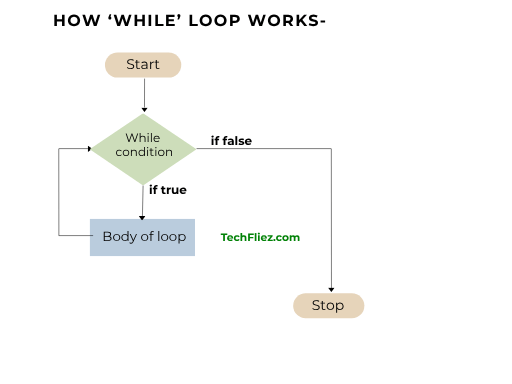
A while loop is a control structure that repeatedly executes a block of code as long as a specified condition is true.
This loop will execute until the condition is given false.
- Always update loop variable.
- Avoid infinite loops.
- Use break carefully.
- Prefer for loop when iterations are known.
Syntax of while Loop
while (condition) {
   // code to execute
}
Basic Example
let i = 1;

while (i <= 5) {
   console.log(i);
   i++;
}
Output:
2
3
4
5
How the While Loop Works
- Condition is checked
- If true → code executes
- Loop repeats
- Stops when condition becomes false
Flow Example of While Loop
let i = 0;

while (i < 3) {
   console.log(i);
   i++;
}
Execution:
- i = 0 → print 0
- i = 1 → print 1
- i = 2 → print 2
- i = 3 → stop
while Loop vs for Loop
| Feature | while Loop | for Loop |
|---|---|---|
| Use Case | Unknown iterations | Known iterations |
| Syntax | Simple | Structured |
| Control | Flexible | Compact |
Real-Life Examples
You will see some real-life examples.
1. Countdown Timer
let count = 5;

while (count > 0) {
   console.log(count);
   count--;
}
Output:
4
3
2
1
2. Iterating Array
let count = 5;

while (count > 0) {
   console.log(count);
   count--;
}
Output:
20
30
Break and Continue Statement in While Loop
1. Break Statement in While Loop
It is used to stop the loop immediately.
let i = 1;

while (i <= 5) {
   if (i === 3) break;
   console.log(i);
   i++;
}
Output:
2
2. Continue Statement in While Loop
It is used to skip the current iteration.
let i = 1;

while (i <= 5) {
   i++;
   if (i === 3) continue;
   console.log(i);
}
Output:
4
5
6
Common Mistakes
You will see some common mistakes.
1. Infinite Loop
In the example below, if the user missed i++ in the code.
let i = 1;

while (i <= 5) {
   console.log(i);
   // missing i++
}
2. Wrong Condition
while (false) {
   console.log("Never runs");
}
while Loop vs do...while Loop
| Feature | while | do...while |
|---|---|---|
| Condition Check | Before execution | After execution |
| Execution | 0 or more times | At least once |
| Syntax |
while(condition) {
|
do {
|
| Example |
let i = 1;
|
let i = 1;
|
Javascript While loop – Interview Questions
Q 1: What is a while loop?
Q 2: Is it entry-controlled?
Q 3: When to use a while loop?
Q 4: Can a while loop run infinitely?
Q 5: Is a break supported?
Javascript While loop – Objective Questions (MCQs)
Q1. The while loop checks the condition ______.
Q2. The while loop is used when the number of iterations is ______.
Q3. If the condition is false initially, the loop will execute ______.
Q4. Which keyword skips the current iteration?
Q5. A missing condition update may cause ______.
Conclusion
The JavaScript while loop is a powerful and flexible looping structure that allows you to execute code based on a condition. It is especially useful when you don’t know in advance how many times the loop should run.
By understanding how to use the while loop effectively—along with its variations like do...while—you can handle real-world programming scenarios such as user input validation, data processing, and continuous operations.