
Introduction
In this tutorial, you will learn the concept of the Event Loop in JavaScript.
JavaScript is a single-threaded programming language. It means to execute one task at a time.
But modern applications perform many tasks like API calls, timers, and user interactions simultaneously.
Q: How does JavaScript handle blocking tasks?
Ans: through the Event Loop.
What is the Event Loop in JavaScript?
The Event Loop is a mechanism that allows JavaScript to perform non-blocking asynchronous operations.
Process:
It continuously checks whether the Call Stack is empty, and if it is empty, it moves tasks from the Callback Queue to the Call Stack for execution.
JavaScript Execution Components
To understand the Event Loop, you need to know these four components:
- Call Stack
- Web APIs
- Callback Queue
- Event Loop
1. Call Stack
The Call Stack is where JavaScript executes functions.
Example:
 function greet(){
   console.log("Hello");
}
greet();
Execution order:
Call Stack
---------
greet()
console.log()
Note: Functions are added to the stack and removed after execution.
2. Web APIs
Web APIs are provided by the browser environment.
Examples like:
- setTimeout()
- fetch()
- DOM events
- Geolocation
Example:
setTimeout(function(){
   console.log("Hello after 2 seconds");
}, 2000);
Note: The timer is handled by Web APIs, not the Call Stack.
3. Callback Queue
When asynchronous tasks finish in Web APIs, their callback functions move to the Callback Queue.
Example of a Queue:
- setTimeout callback
- click event callback
- fetch response callback
Note: But these functions do not execute immediately.
4. Event Loop
The Event Loop constantly checks: “Is the call stack empty?“
If YES, it moves the first function from the Callback Queue to the Call Stack.
Process:
Callback Queue → Event Loop → Call Stack
Event Loop Example
console.log("Start");
setTimeout(function(){
   console.log("Inside Timeout");
}, 0);
console.log("End");
Output
End
Inside Timeout
Execution Of the Process:
- console.log(“Start”)
- setTimeout() goes to Web API
- console.log(“End”)
- Timeout callback goes to queue
- Event Loop moves it to Call Stack
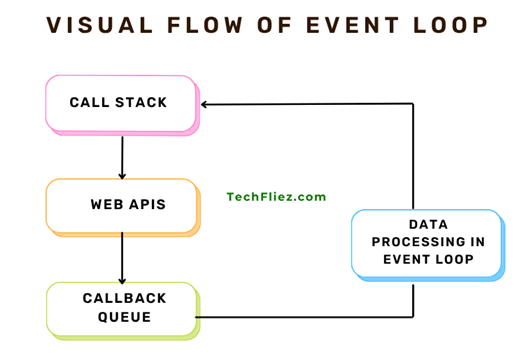
Visual Flow of Event Loop
Call Stack
   ↓
Web APIs
   ↓
Callback Queue
   ↓
Event Loop
   ↓
Call Stack
Event Loop Summary Table
| Component | Purpose |
|---|---|
| Call Stack | Executes JavaScript functions |
| Web APIs | Handles asynchronous operations |
| Callback Queue | Stores completed async callbacks |
| Event Loop | Moves callbacks to Call Stack |
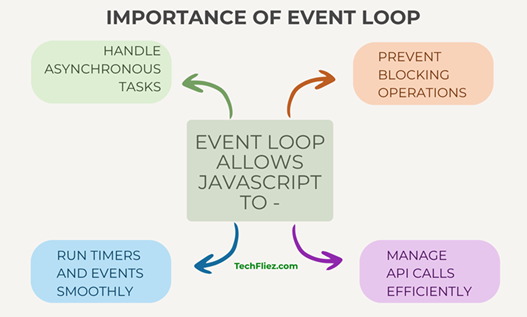
Why is the Event Loop Important?
The Event Loop allows JavaScript to:
- Handle asynchronous tasks
- Prevent blocking operations
- Manage API calls efficiently
- Run timers and events smoothly
Note: Without the Event Loop, JavaScript applications would freeze while waiting for long operations.
Real-Life Example of Event Loop in JavaScript
Example: Food Order in a Restaurant
Suppose, you go to a restaurant and place an order.
- You place your order with the waiter.
- The waiter sends the order to the kitchen.
- While the food is being prepared, the waiter serves other customers.
- When the food is ready, the waiter brings it to you.
This is very similar to how the JavaScript Event Loop works.
- The main thread is like the waiter.
- Long tasks (like API calls or timers) go to the Web APIs (kitchen).
- When they are finished, they go to the callback queue.
- The event loop checks if the call stack is empty and then pushes the callback to execute.
Example:
console.log("Start");
setTimeout(() => {
  console.log("Loading data...");
}, 2000);

console.log("End");
Output:
End
Loading data…
Explanation:
- Start is executed first.
- setTimeout() is sent to Web APIs.
- End runs immediately.
- After 2 seconds, the callback moves to the callback queue.
- The event loop moves it to the call stack when it becomes empty.
Interview Questions
Q 1: What is the Event Loop in JavaScript?
Q 2: Why is the Event Loop important?
Q 3: What are the main components involved in the Event Loop?
Q 4: What happens when the call stack is empty?
Q 5: Is JavaScript single-threaded?
Conclusion
The Event Loop is one of the most important concepts in JavaScript because it enables asynchronous programming.
As you know, JavaScript works on a single thread. The Event loop allows it to handle multiple operations without blocking the main thread.