
Introduction
In this article, we will explore the most common async/await mistakes in JavaScript and how to fix them.
Async/Await is used to handle asynchronous code in JavaScript. It makes code easier to read compared to callbacks and promises.
Sometimes, many developers make mistakes while using async/await, which can cause bugs, performance issues, or unexpected behavior.
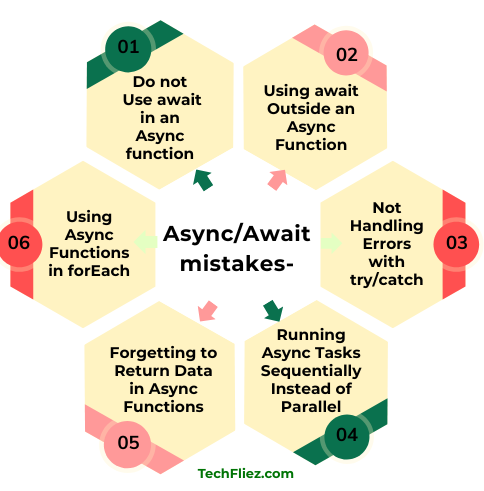
1. Forgetting to Use await
This is a common mistake to forget to await in an async function.
❌ Incorrect
async function getData() {
  return "Hello";
}
function showData() {
  const data = getData();
  console.log(data);
}
showData();

Output:
Promise {}
✅ Correct
async function getData() {
  return "Hello";
}
async function showData() {
  const data = await getData();
  console.log(data);
}
showData();
Note: Always use await when you need the resolved value of a promise.
2. Using await Outside an Async Function
You can use the await keyword only inside an async function.
❌ Incorrect
function loadData() {
  const data = await fetch("api/data");
}
Note: This will cause an error.
✅ Correct
async function loadData() {
  const data = await fetch("api/data");
}
3. Not Handling Errors with try/catch
When developers work with APIs then might be a chance to fail the response, so you can handle it through try/catch.
❌ Incorrect
async function getUsers() {
  const response = await fetch("api/users");
  const data = await response.json();
  console.log(data);
}
Note: If you did not use try-catch, then this situation app may crash.
✅ Correct
async function getUsers() {
  try {
    const response = await fetch("api/users");
    const data = await response.json();
    console.log(data);
  } catch (error) {
    console.log("Error:", error);
  }
}
4. Running Async Tasks Sequentially Instead of Parallel
Sometimes developers use await multiple times, causing unnecessary delays.
❌ Slow Code
async function loadData() {
  const user = await fetch("/user");
  const posts = await fetch("/posts");
}
Note: This runs one request after another.
✅ Faster Approach
async function loadData() {
  const [user, posts] = await Promise.all([
    fetch("/user"),
    fetch("/posts")
  ]);
}
Note: Promise.all() runs tasks in parallel, it is used to improve performance.
5. Forgetting to Return Data in Async Functions
Many Developers sometimes forget that async functions always return a Promise.
❌ Incorrect
async function getMessage() {
  "Hello World";
}
6. Using Async Functions in forEach
You should not use forEach with async/await.
❌ Incorrect
users.forEach(async (user) => {
  await sendEmail(user);
});
✅ Correct
for (const user of users) {
  await sendEmail(user);
}
OR
await Promise.all(users.map(user => sendEmail(user)));
Quick Summary
| Mistake | Problem | Solution |
|---|---|---|
| Forgetting await | Returns Promise instead of actual value | Use await to get resolved value |
| await outside async | Syntax error occurs | Use await inside an async function |
| No error handling | Application may crash if request fails | Use try…catch block |
| Sequential requests | Slow performance due to waiting for each task | Use Promise.all() for parallel execution |
| Missing return | Function returns undefined | Always return the required value |
| Async in forEach | Unpredictable execution order | Use for…of loop or Promise.all() |
Real-Life Example of Async/Await Mistakes in JavaScript
Example: Forgetting to Use await
It’s a very common mistake when developers forget to use await when calling an async function.
Imagine a shopping website where product data is loaded from an API. If await is not used correctly, the application may try to use data before it is available.
Incorrect Example:
async function getProducts() {
  return fetch("https://api.example.com/products")
    .then(res => res.json());
}

function showProducts() {
  const products = getProducts(); // Missing await
  console.log(products);
}

showProducts();
Output:
Note: Instead of getting product data, we get a Promise object because the function is asynchronous.
Correct Example:
async function getProducts() {
  const response = await fetch("https://api.example.com/products");
  const data = await response.json();
  return data;
}

async function showProducts() {
  const products = await getProducts();
  console.log(products);
}

showProducts();
Explanation:
- getProducts() returns a promise.
- Without await, the result will be a pending promise.
- Using await pauses execution until the promise resolves.
- Then the actual data becomes available.
Interview Questions
No questions found.
Conclusion
async/await is good to handle asynchronous Operations in JavaScript, but developers must use it correctly. Sometimes developers make a mistake and forget to await in async operations. By understanding how async functions and promises work together, developers can write cleaner, more reliable, and more efficient JavaScript applications.