
Introduction
Every programming language deals with data, and JavaScript is no exception. Whether you’re building a simple calculator or a complex web application, understanding how data is stored and manipulated is essential. This is where data types come into play.
JavaScript is a dynamically typed language, meaning you don’t need to specify the type of data when declaring a variable. However, knowing the different data types helps you write better, more efficient, and error-free code.
In this guide, you’ll learn everything about JavaScript data types, including their types, examples, real-life use cases, common mistakes, and interview questions.
What are JavaScript Data Types?
A data type defines the type of value a variable can hold. It determines what kind of operations can be performed on that value.
Example:
let name = "John"; // String
let age = 35;      // Number
Here, "John" is a string, and 35 is a number.
Types of JavaScript Data Types
JavaScript data types are divided into two main categories:
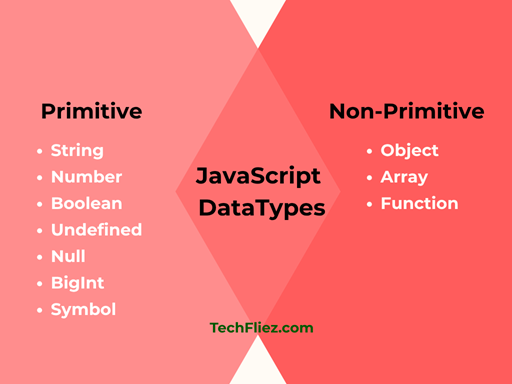
1. Primitive Data Types
This type of datatype is immutable, and it does not have properties. When you make a copy, it will be a real copy.
Example:- when you reassign a new value to b, the value of b changes, but not of a.
 <script>
 const a = "John";
 let b = a   // this is the copy
 b = "Rom";
 document.write(b) // Rom
 document.write(a) // John
 </script>
List of Primitive Types:
- String
- Number
- Boolean
- Undefined
- Null
- BigInt
- Symbol
1. String
It is basically used to store a string value, and a string value is represented by single quotes or double quotes.
Example:
 var name="John";
 console.log(typeof name);  //string
2. Number
Represents numeric values (both integer and floating-point).
Example:
let price = 99.99;
let quantity = 10;
3. Boolean
Represents logical values: true or false.
Example:
 var is_loggedin=true;
 console.log(is_loggedin);  //true

 var not_loggedin=false;
 console.log(not_loggedin);  //false
4. Undefined
A variable is declared but not assigned a value.
Example:
let x;
console.log(x); // undefined
5. Null
It represents an intentional absence of value.
Example:
let data = null;
6. BigInt
Used to represent large integers beyond the safe limit of Number.
Example:
let bigNumber = 12345678901234567890n;
7. Symbol
A unique and immutable value often used as object keys.
Example:
let id = Symbol("id");
2. Non-Primitive (Reference) Data Types
Non-primitive types can store multiple values and are mutable, like Object, Array, and Function.
1. Object
Objects store data in key-value pairs.
Example:
let person = {
   name: "John",
   age: 35
};
2. Array
Arrays store multiple values in a single variable.
Example:
let fruits = ["Apple", "Banana", "Mango"];
3. Function
Functions are also treated as objects in JavaScript.
Example:
function greet() {
   return "Hello!";
}
Difference Between Primitive and Non-Primitive
| Feature | Primitive | Non-Primitive |
|---|---|---|
| Value Type | Single | Multiple |
| Mutability | Immutable | Mutable |
| Storage | Stack | Heap |
| Example | String, Number | Object, Array |
Dynamic Typing in JavaScript
JavaScript allows variables to change their type during runtime.
Example:
let value = 10;
value = "Hello";
value = true;
In the above example, you can see dynamic typing.
How to check Data Types
You can check the type of a variable using the typeof operator.
Example:
typeof "Hello"; // string
typeof 100;     // number
typeof true;    // boolean
Type Conversion (Type Casting)
JavaScript allows conversion between data types.
1. Implicit Conversion
It is automatically done by JavaScript.
Example:
let result = "5" + 2; // "52"
2. Explicit Conversion
Manually done using functions.
Example:
Number("10"); // 10
String(100);  // "100"
Boolean(1);   // true
Common Mistakes
You will see some common mistakes.
1. Using == Instead of ===
5 == "5";  // true
5 === "5"; // false
2. Ignoring NaN
let x = "abc" / 2; // NaN
3. Misunderstanding typeof null
typeof null; // object (bug in JavaScript)
JavaScript Datatype – Interview Questions
Q 1: What are JavaScript data types?
Q 2: How many types of data types are there?
Q 3: What is the difference between null and undefined?
null: intentionally empty
Q 4: What is the typeof operator?
Q 5: Is JavaScript dynamically typed?
Q 6: What is NaN?
JavaScript Datatype – Objective Questions (MCQs)
Q1. Which of the following is a primitive data type in JavaScript?
Q2. What is the data type of true?
Q3. Which keyword is used to check a variable’s data type?
Q4. What is the data type of null in JavaScript?
Q5. Which of the following is a non-primitive data type?
Conclusion
JavaScript data types are the building blocks of any program. By understanding primitive and non-primitive types, along with type conversion and dynamic typing, you can write efficient and error-free code.
If you have a good knowledge of data types, then it will help you avoid common bugs and prepare you for advanced JavaScript concepts like objects, APIs, and frameworks.