
Introduction
The do…while loop is slightly different from other loops because it executes the code block at least once, regardless of whether the condition is true or false.
This makes it especially useful in situations where you want the code to run first and then check the condition afterward—such as user input validation, menu-driven programs, or retry logic.
In this guide, you’ll learn everything about the JavaScript do…while loop, including syntax, working, examples, real-life use cases, common mistakes, and interview questions.
What is a do…while Loop?
A do…while loop is a control structure that executes a block of code once first, and then repeatedly executes it as long as a specified condition is true.
A do-while loop runs at least once because it is checked at the end of the iteration.
- Use meaningful conditions.
- Avoid infinite loops.
- Use break carefully.
Syntax of do…while Loop
do {
   // code to execute
} while (condition);
Basic Example
let i = 1;

do {
   console.log(i);
   i++;
} while (i <= 5);
Output:
2
3
4
5
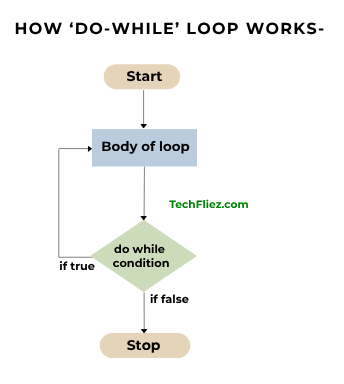
How do...while Loop Works
- Code block executes first
- The condition is checked
- If true → loop repeats
- If false → loop stops
Flow Example
let i = 0;

do {
   console.log(i);
   i++;
} while (i < 3);
Execution:
- i = 0 → print 0
- i = 1 → print 1
- i = 2 → print 2
- i = 3 → stop
while vs do...while
| Feature | while | do...while |
|---|---|---|
| Condition Check | Before execution | After execution |
| Execution | 0 or more times | At least once |
| Syntax |
while(condition) {
|
do {
|
| Example |
let i = 1;
|
let i = 1;
|
Real-Life Examples: Menu System
let choice;

do {
   console.log("1. Add");
   console.log("2. Delete");
   console.log("3. Exit");

   choice = prompt("Enter choice:");
} while (choice !== "3");
Output:
2. Delete
3. Exit
Enter choice:
2. Countdown Timer
let count = 5;

do {
   console.log(count);
   count--;
} while (count > 0);
Output:
4
3
2
1
Break and Continue Statement in do...while Loop
Break Statement in do...while Loop
It stops the loop immediately.
Example:
let i = 1;

do {
   if (i === 3) break;
   console.log(i);
   i++;
} while (i <= 5);
Output:
2
Continue Statement in do...while Loop
It is used to skip the current iteration.
let i = 0;

do {
   i++;
   if (i === 3) continue;
   console.log(i);

} while (i <= 5);
Output:
2
4
5
6
When to Use do...while Loop
You should use do...while Loop when
- Code must execute at least once
- Taking user input
- Menu-driven programs
- Retry operations
- Validation scenarios
When NOT to Use
You should avoid when:
- The condition should be checked first.
- Execution depends strictly on the condition.
- No guaranteed first run is needed.
Common Mistakes
You will see a common mistake when using a do...while Loop
1. Infinite Loop
When the developer missed i++ in the code.
let i = 1;

do {
   console.log(i);
} while (i <= 5); // missing i++
2. Forgetting Semicolon
When the developer missed a semicolon in the code.
do {
   console.log("Test");
} while (true) // missing ;
JavaScript do-while loop – Interview Questions
Q 1: What is a do...while loop?
Q 2: Is it exit-controlled?
Q 3: Condition checked when?
Q 4: Use case?
Q 5: Can it be infinite?
JavaScript do-while loop – Objective Questions (MCQs)
Q1. The do...while loop executes the code block at least ______.
Q2. The condition in do...while is checked ______.
Q3. Which loop guarantees at least one execution?
Q4. The do...while loop ends with a ______.
Q5. do...while is useful when the loop body must run ______.
Conclusion
The JavaScript do...while loop is a powerful control structure that ensures a block of code runs at least once before evaluating the condition. It is particularly useful for scenarios like user input validation, retry mechanisms, and menu-driven programs.