
Introduction
Loops are an essential part of programming, allowing you to execute a block of code multiple times. In JavaScript, one of the most commonly used loops is the for loop.
In this guide, you’ll learn everything about the JavaScript for loop, including syntax, working, types, real-life examples, common mistakes, and interview questions.
What is a for Loop?
A for loop is a control structure that repeats a block of code as long as a specified condition is true.
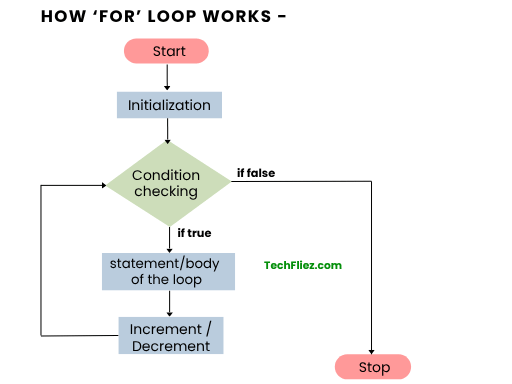
It has 3 parts
- Initialization
- Condition
- Increment/Decrement
- Use let instead of var in for loop variables.
- Avoid unnecessary nesting.
- Prefer for…of for arrays.
Syntax of for Loop
for (initialization; condition; increment/decrement) {
   // code to execute
}
Basic Example
for (let i = 1; i <= 5; i++) {
   console.log(i);
}
Output:
2
3
4
5
How for Loop Works
There are some steps in the Loop works
- Initialization runs once
- The condition is checked
- Code block executes
- Increment/decrement happens
- Steps repeat until the condition is false
Flow Example
for (let i = 0; i < 3; i++) {
   console.log(i);
}
Execution order:
- i = 0 → print 0
- i = 1 → print 1
- i = 2 → print 2
- i = 3 → stop
Real-Life Examples: Multiplication Table
let num = 5;

for (let i = 1; i <= 10; i++) {
   console.log(num * i);
}
Output:
10
15
20
25
30
35
40
45
50
Types of for Loop
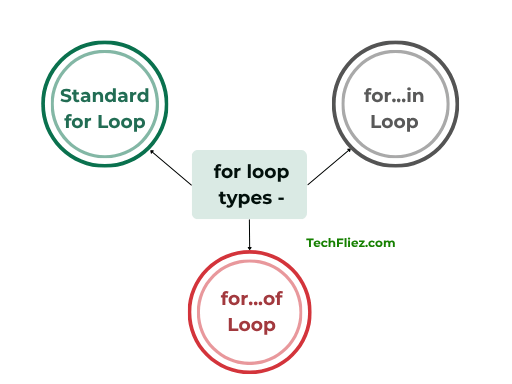
There are 3 types of for loops.
1. Standard for Loop
for (let i = 0; i < 5; i++) {}
2. for...in Loop
It is used for Objects and to iterate over object properties.
let user = { name: "John", age: 35 };

for (let key in user) {
   console.log(key, user[key]);
}
3. for...of Loop
It is used for arrays and to iterate over array properties.
let arr = [1, 2, 3];

for (let value of arr) {
   console.log(value);
}
Nested for Loop
When one loop runs inside another loop.
for (let i = 1; i <= 3; i++) {
   for (let j = 1; j <= 2; j++) {
       console.log(i, j);
   }
}
Output:
1 2
2 1
2 2
3 1
3 2
Break and Continue Statement in For Loop
You will see how to use break and continue statements in a for loop.
1. break Statement
It is used to stop the loop.
for (let i = 1; i <= 5; i++) {
   if (i === 3) break;
   console.log(i);
}
Output:
2
2. continue Statement
It is used to skip an iteration.
for (let i = 1; i <= 5; i++) {
   if (i === 3) continue;
   console.log(i);
}
Output:
2
4
5
Common Mistakes
Kindly check some common mistakes.
1. Infinite Loop
In the example below, the 3rd parameter should be i++ instead of i--. When this code runs, it will execute indefinitely.
for (let i = 1; i <= 5; i--) {} // never ends
2. Wrong Condition
In the example below, the code never runs.
for (let i = 0; i > 5; i++) {}
Javascript for loop – Interview Questions
Q 1: What is a for loop?
Q 2: Syntax of the for loop?
Q 3: Is the for loop entry-controlled?
Q 4: Can a for loop be nested?
Q 5: Use case?
Javascript for loop – Objective Questions (MCQs)
Q1. The for loop is used when the number of iterations is ______.
Q2. How many parts does a for loop have?
Q3. Which part executes only once in a for loop?
Q4. Which keyword exits a loop immediately?
Q5. Which loop is best for array index-based iteration?
Conclusion
The JavaScript for loop is one of the most powerful and commonly used tools for repeating tasks. It allows you to iterate over data efficiently and perform operations multiple times with minimal code.