
Introduction
In this tutorial, you will learn the concept of Callback Hell. As you know, JavaScript is asynchronous by nature, and developers often use callbacks to handle asynchronous operations.
What is Callback Hell?
When multiple callbacks are nested, the code becomes hard to read and maintain, a situation known as Callback Hell.
Callback Example
A callback is simply a function that is passed as a parameter to another function.
Example:
function greet(name, callback) {
    console.log("Hello " + name);
    callback();
}
function sayBye() {
    console.log("Goodbye!");
}
greet("John", sayBye);
Output:
Goodbye!
Note: sayBye() is a callback function.
Example of Callback Hell
Suppose you need to handle several asynchronous tasks in sequence.
setTimeout(function() {
    console.log("Step 1 completed");
    setTimeout(function() {
        console.log("Step 2 completed");
        setTimeout(function() {
            console.log("Step 3 completed");
            setTimeout(function() {
                console.log("Step 4 completed");
            }, 1000);
        }, 1000);
    }, 1000);
}, 1000);
You can see that this code quickly becomes messy and difficult to manage.
Visual Structure
Task 1
 └── Task 2
      └── Task 3
           └── Task 4
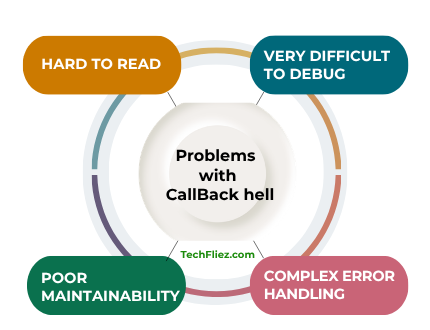
What is the Problem with Callback Hell
There are many problems with Callback Hell
- It is Hard to read.
- It is very difficult to debug.
- It has Poor Maintainability.
- It has Error Handling Becomes Complex.
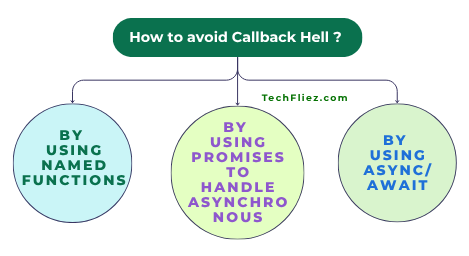
How to Avoid Callback Hell
Modern JavaScript provides several solutions to avoid Callback Hell.
1. Using Named Functions
Instead of nesting anonymous callbacks, you can separate them into functions.
setTimeout(step1, 1000);
function step1() {
    console.log("Step 1 completed");
    setTimeout(step2, 1000);
}
function step2() {
    console.log("Step 2 completed");
    setTimeout(step3, 1000);
}
function step3() {
    console.log("Step 3 completed");
}
2. Using Promises to handle Asynchronous
Promises help avoid deep nesting.
function task(message) {
    return new Promise(function(resolve) {
        setTimeout(function() {
            console.log(message);
            resolve();
        }, 1000);
    });
}
task("Step 1")
.then(() => task("Step 2"))
.then(() => task("Step 3"))
.then(() => task("Step 4"));
3. Using Async/Await
async/await is the best solution to handle asynchronous code.
function task(message) {
    return new Promise(resolve => {
        setTimeout(() => {
            console.log(message);
            resolve();
        }, 1000);
    });
}
async function runTasks() {
    await task("Step 1");
    await task("Step 2");
    await task("Step 3");
    await task("Step 4");
}
runTasks();
Callback vs Promise vs Async/Await
| Feature | Callback | Promise | Async/Await |
|---|---|---|---|
| Code Readability | Low | Medium | High |
| Error Handling | Difficult | Better | Best |
| Nesting Problem | Yes | No | No |
| Modern Usage | Rare | Common | Very Common |
What are the best Practices to Avoid Callback Hell?
There are many best practices to avoid Callback Hell
- Keep functions small and modular.
- Use Promises instead of callbacks
- Prefer async/await in modern JavaScript
- Use proper error handling.
- Avoid deeply nested code.
Real-Life Example of Callback Hell in JavaScript
I will show you a Real Life Example like the Website User Registration Process
Website User Registration Process
Suppose you sign up on the website, then it will perform several steps in sequence:
- Create a user account
- Send a verification email
- Verify the email
- Log the user in
- Redirect to the dashboard
You see, each step depends on the previous process to finish. If we implement this using nested callbacks, the code becomes deeply nested and difficult to manage. This situation is called Callback Hell.
Example:
function createUser(callback) {
    setTimeout(function() {
        console.log("User account created");
        callback();
    }, 1000);
}

function sendEmail(callback) {
    setTimeout(function() {
        console.log("Verification email sent");
        callback();
    }, 1000);
}

function verifyEmail(callback) {
    setTimeout(function() {
        console.log("Email verified");
        callback();
    }, 1000);
}

function loginUser(callback) {
    setTimeout(function() {
        console.log("User logged in");
        callback();
    }, 1000);
}

createUser(function() {
    sendEmail(function() {
        verifyEmail(function() {
            loginUser(function() {
                console.log("Redirecting to dashboard...");
            });
        });
    });
});
Interview Questions
Q 1: What is Callback Hell in JavaScript?
Q 2: Why does Callback Hell happen?
Q 3: How do you avoid Callback Hell?
Q 4: Is Callback Hell still common today?
Conclusion
Callback Hell occurs when multiple asynchronous operations are handled using deeply nested callbacks. That created code is very difficult to read, maintain, and debug.
In Modern JavaScript, you can solve this problem with Promises and async/await, which allow developers to write asynchronous code in a cleaner and more structured way.