
Introduction
You can store key-value pairs using Objects. A map is used to handle data collections in JavaScript.
Both Map and Object store data in key-value format, but they behave differently.
What is an Object in JavaScript?
In JavaScript, An Object is used to store data in key-value pairs.
Example:
const user = {
  name: "John",
  age: 35,
  role: "Developer"
};
console.log(user.name);
Output:
Important Features of Objects
There are some important features of Objects.
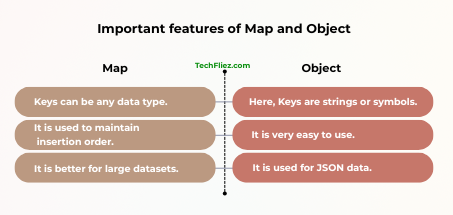
1. Keys are strings or symbols.
2. It is very easy to use.
3. It is used for JSON data.
What is a Map in JavaScript?
A Map is introduced in ES6. It is a special collection and used to store key-value pairs and remembers the original insertion order.
Example:
const user = new Map();
user.set("name", "John");
user.set("age", 35);
console.log(user.get("name"));
Output:
Important Features of Map
There are many important features of the Map.
1. Keys can be any data type.
2. It is used to maintain insertion order.
3. It is a built-in size property.
4. It is better for large datasets.
Map vs Object in JavaScript
| Feature | Map | Object |
|---|---|---|
| Key Types | Any data type (object, function, number) | Only string or symbol |
| Order | Maintains insertion order | Order is not guaranteed |
| Size | Use map.size | Need Object.keys(obj).length |
| Iteration | Directly iterable | Not directly iterable |
| Performance | Better for frequent additions/removals | Better for simple data structures |
| Built-in Methods | set(), get(), has(), delete() | Limited built-in methods |
Example: Object vs Map
Using Object:
const obj = {};
obj["name"] = "John";
obj["age"] = 35;
console.log(obj);
Output:
Using Map:
const map = new Map();
map.set("name", "John");
map.set("age", 35);
console.log(map);
Output:
When to Use a Map?
There are many reasons to use a map.
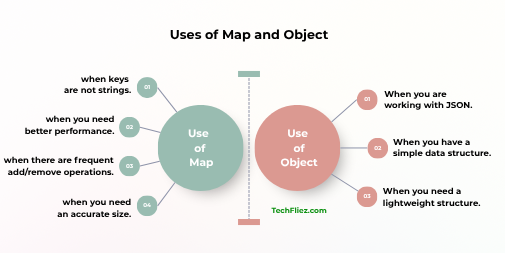
1. You can use Map when keys are not strings.
2. You can use Map when you need better performance.
3. You can use Map when there are frequent add/remove operations.
4. You can use a map when you need an accurate size.
When to Use an Object?
There are many reasons to use an object.
1. When you are working with JSON.
2. When you have a simple data structure.
3. When you need a lightweight structure.
Common Mistakes in Map and Object
1. Using Object when keys are not strings
Many developers use an Object even when the keys are numbers or other data types. In JavaScript Objects, keys are automatically converted to strings.
Example:
let obj = {};
obj[1] = "Hello";
obj["1"] = "World";
console.log(obj);
// Both keys become "1"
2. Forgetting that Map has a Methods
Some developers treat Map like an Object and forget that Map has useful methods
- set()
- get()
- has()
- delete()
Example:
let map = new Map();
map.set("name", "John");
console.log(map.get("name"));
Output:
Real Life Example of Tracking Website Visitors
Suppose you want to store information about visitors on a website.
When we use Object to track the visitors
let visitors = {};
visitors["user1"] = "Login";
visitors["user2"] = "Logout";
visitors["user3"] = "Login";
console.log(visitors["user1"]);
console.log(visitors["user2"]);
Output:
Logout
Note: This works fine when the keys are simple strings.
When we use Map to track the visitors
Suppose each user is represented by an object.
let visitors = new Map();
let user1 = {id: 1};
let user2 = {id: 2};
let user3 = {id: 3};
visitors.set(user1, "Login");
visitors.set(user2, "Logout");
visitors.set(user3, "Login");

console.log(visitors.get(user1));
console.log(visitors.get(user3));
Output:
Login
Note: Map is better because it allows objects to be used as keys.
Conclusion
Both Map and Object are used to store key-value pairs in JavaScript. Objects are used for basic data storage, especially when keys are strings. Maps provide more flexibility because they allow keys of any data type and maintain the insertion order of elements.
In modern JavaScript applications, developers often prefer Map when working with dynamic data or complex key types, while Objects remain useful for structured data and JSON-based operations.