
In this tutorial, you will learn why undefined appears instead of Value in JavaScript.
Introduction
This problem is one of the most common problems that developers face in JavaScript.
It appears undefined instead of the expected value.
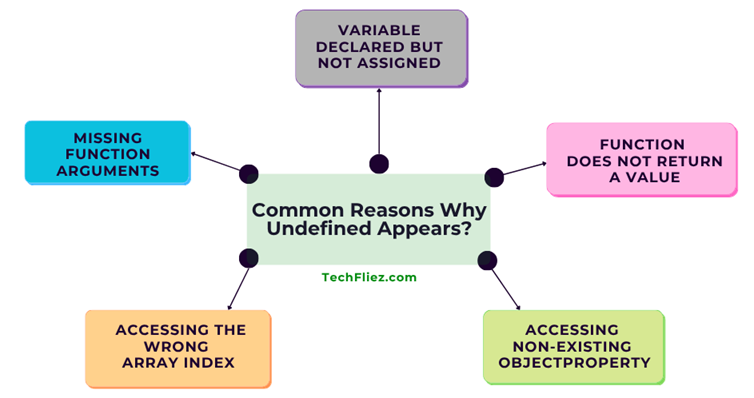
When does this error usually happen?
There are many reasons for this error.
1. A variable is declared but not assigned a value.
2. A function does not return anything.
3. An object property does not exist.
4. An array index is incorrect.
What is undefined in JavaScript?
In JavaScript, Undefined means a variable exists, but a value has not been assigned to it yet.
Example:
let name;
console.log(name);
Output:
What are the common Reasons Why Undefined Appears?
There are many reasons why undefined Appears.
1. Variable Declared but Not Assigned
If a variable is declared but not initialized, then JavaScript returns undefined.
Example:
let age;
console.log(age);
Output:
2. Function Does Not Return a Value
If a function does not return anything, the result will be undefined.
Example:
function getName() {
  console.log("John");
}
let result = getName();
console.log(result);
Output:
undefined
3. Accessing Non-Existing Object Property
If you try to access a property that does not exist in an object.
Example:
const user = {
  name: "John"
};
console.log(user.age);
Output:
4. If you are accessing the wrong Array Index
If you are accessing an index that does not exist will return undefined.
Example:
const numbers = [10, 20, 30];
console.log(numbers[4]);
Output:
5. Missing Function Arguments
If a function expects parameters but you did not defined.
Example:
function greet(name) {
  console.log(name);
}
greet();
Output:
How to Fix Undefined Issues?
There are many ways to fix the undefined issue.
1. Assign Default Values
Example:
let name = "Guest";
2. Use Default Parameters
Example:
function greet(name = "Guest") {
  console.log(name);
}
3. Check Property Existence
Example:
if(user.age !== undefined){
   console.log(user.age);
}
Quick Comparison: Undefined vs Null
| Feature | Undefined | Null |
|---|---|---|
| Meaning | Variable declared but not assigned | Intentional empty value |
| Assigned by | JavaScript | Developer |
| Type | undefined | object |
Real-Life Example
1. User Profile Example
Suppose you are creating a user profile page:
let user = {
  name: "John",
  age: 35
};

console.log(user.email);
Output:
Explanation:
- The email property does not exist in the user object.
- JavaScript doesn’t throw an error — instead, it returns undefined.
2. API Data Example
let data = {};
console.log(data.user);
console.log(data.user.name);
Output:
Explanation:
- data.user is undefined
- Trying to access .name on undefined causes an error
Interview Questions
Q 1: What is undefined in JavaScript?
Q 2: What is the difference between undefined and null?
null → intentionally assigned by the developer
Q 3: When does undefined occur?
2. Accessing non-existing object property
3. Function without return value
4. Missing function arguments
Q 4: How to avoid getting undefined?
2. Use default values
3. Check object properties before accessing
4. Use optional chaining (?.)
Example:
console.log(data.user?.name);
Q 5: Is undefined == null true?
undefined == null   // true
undefined === null  // false
Conclusion
undefined is not an error in JavaScript. undefined means something is missing or not yet assigned. It commonly appears when variables are uninitialized, properties don’t exist, or functions don’t return values.
Understanding why undefined appears helps you:
- Debug issues faster
- Write safer code
- Avoid runtime errors
Note: Instead of ignoring it, you should handle it properly.